Hi everyone,
We are happy to announce a small but meaningful update to your exploration experience: Simplified Field Description.
 The Problem
Data exploration can feel overwhelming when you just want to know what a field is, not how it was built.Previously, hovering over a field displayed everything at once:
- Field Name & Description
- Field ID & Data Type
- Complex SQL Logic
For many users, this created a “wall of technical text” that obscured the actual business definition they were looking for.
 What’s changed
We have redesigned how field details are displayed to prioritize clarity
- Clean by default: Now, when you hover over a field, we only show you the essentials—the Label, and the Description. This helps you get the context you need immediately, without the noise.
- Technical details on demand: Don’t worry, we haven’t removed the technical details! For Analysts and Editors who need to debug logic or check source paths, you can simply click “Show Definition” (or the expand icon) to reveal the full Model Name, Field ID, and Formula/SQL.
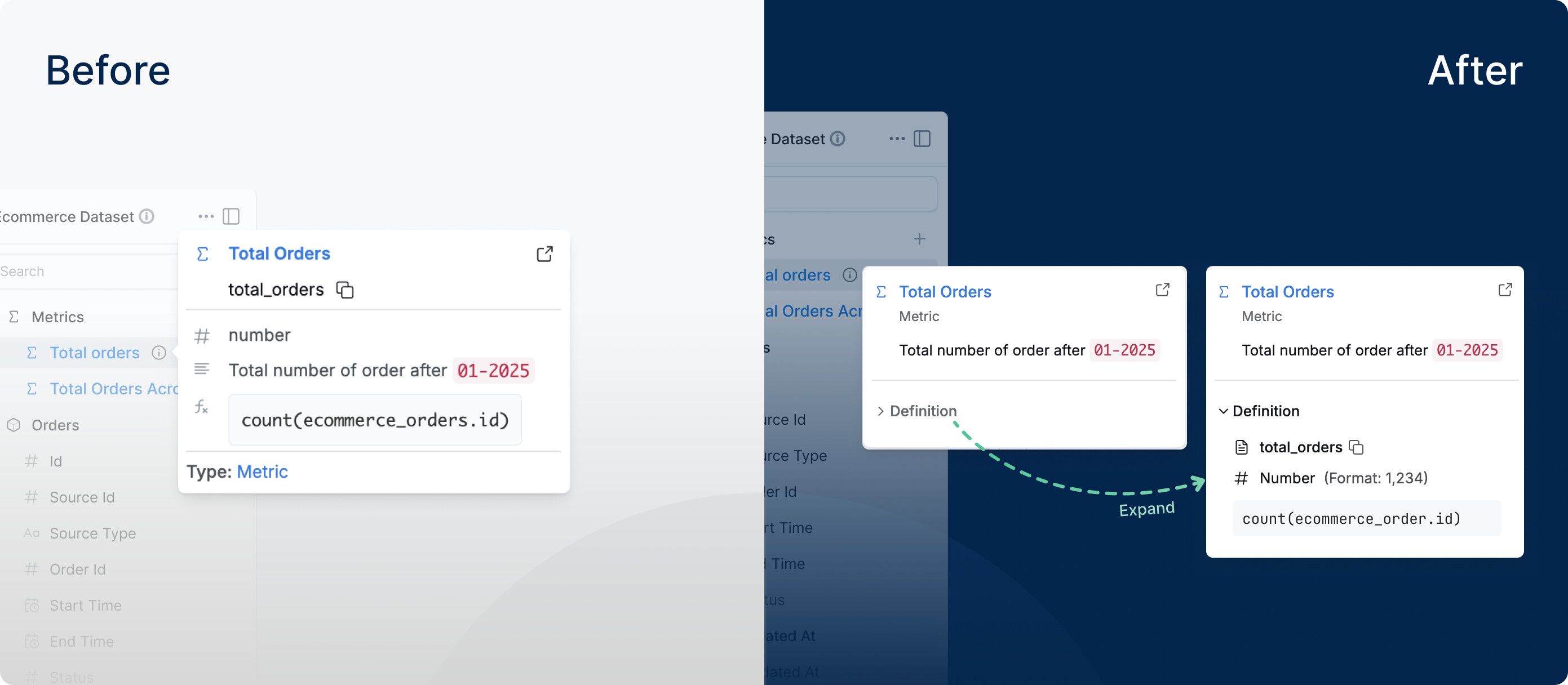
By tucking away the technical metadata until it is actually needed, we hope to reduce cognitive load for Explorers while keeping the platform powerful for the Data Team.
This update is live for everyone today. Let us know what you think in the comments below!