Hi, we are trying to make use of the AML extend feature on a dataset. We would like to add a model to the derived dataset. Is it possible ?
Something like :
Dataset derived_ds = base_ds.extend({
  models: add(base_ds.models, another_table)
})
Hi, we are trying to make use of the AML extend feature on a dataset. We would like to add a model to the derived dataset. Is it possible ?
Something like :
Dataset derived_ds = base_ds.extend({
models: add(base_ds.models, another_table)
})
Hi @dacou, thank you for reaching out. At the moment, we don’t support extending base datasets’ models or extends an array.
However, we already have this item in our roadmap. I will let you know if there’s any update on its progress.
If you can share a bit about your use case, I’m happy to suggest a concrete AML setup or review a snippet.
Hi @Tai_Nguyen ,
Our usecase is the following : we have a main dataset containing metrics and tables about our customer portfolio and their equipment. We want to extend this dataset with additional tables and metrics that permit to perform deeper analysis on some specific product / aspects but we don’t want to overload the main dataset.
The idea was to keep the main dataset as it is and to create some additional “focused” dataset which include additional attributes and metrics as well as a dedicated custom view.
As a workaround we may :
Would that work ?
Hi @dacou, thanks for the detailed context, that helps a lot! I get the goal: Keeping the main dataset lean with focused deep‑dive view.
Regarding your workaround, Dataset View is a great fit here and your plan looks good. If you hit any issues or notice a missing piece while implementing, ping me and I’ll help
Hello @Tai_Nguyen, I have another question using this use case.
We have done the main dataset + the “product specific” dataset (using extend). We have created a view in the extended dataset, using metrics from the main dataset and the extended one but i don’t manage to show the models or selected models in the view as they are only defined on the main dataset and not in the extended one .
This is the code we have used :
Dataset extended_dataset= main_dataset.extend({
engine: ‘aql’
label: ‘’
data_source_name: env.data_source_name
models : main_dataset.models
relationships : main_dataset.relationships
– metrics
–view
})
thanks in advance
Hello @Francisco_DEL_MORAL, thank you for reaching out. Could you help explain more about don’t manage to show the models or selected models in the view as they are only defined on the main dataset and not in the extended one (an example would be useful)?
If I understand correctly, you can’t use the main dataset’s models and metrics in the extended dataset’s view, right?
Hello, thank you for your answer, yes this is the problem.
Example :
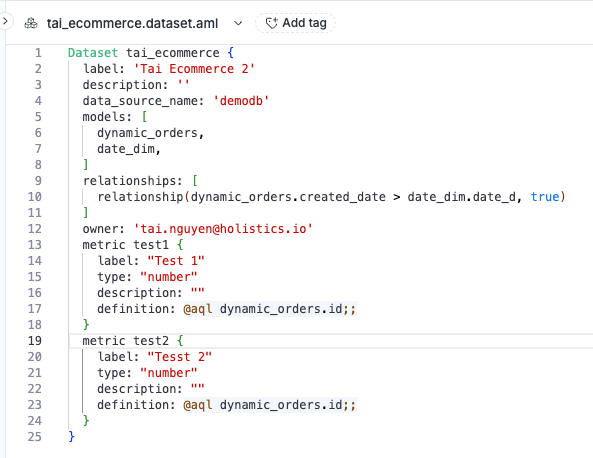
Main Dataset :
model A
model B
model C
metric a
metric b
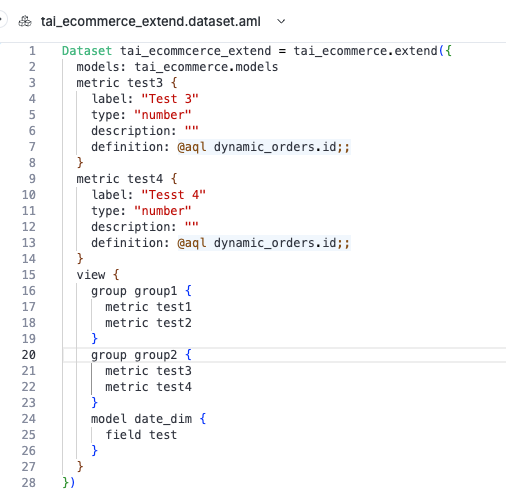
Extended Dataset (using configuration from previous comment ) :
View (inside extended dataset ) :
group 1 :
group 2 :
That is what i have manage to do and it’s working. The problem comes when i try to add to the view in the extended dataset one of the models from the main dataset as it does not recognize it.
Example:
View (inside extended dataset ) :
I got this error : Error: In View{}, Model ‘name of the model’ not found
Hi @Francisco_DEL_MORAL, Thank you for your reply.
I’m trying to reproduce your issue, but I can’t
My code:
Main dataset:
Extended dataset:
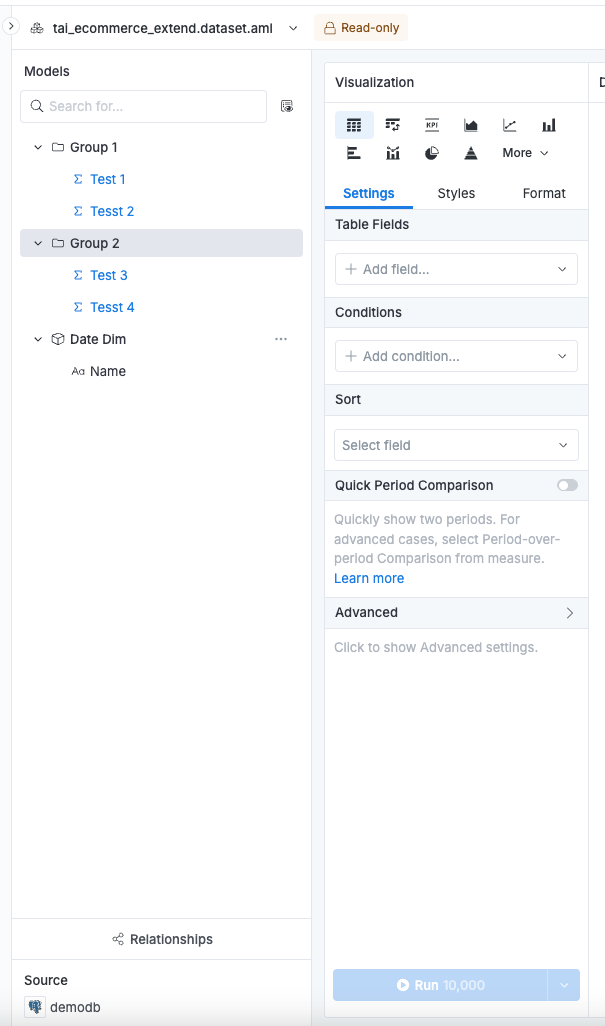
The result:
Could you help recheck your code? If possible, could you help submit a support ticket to [email protected] with your code or screenshots so we can investigate further?
Hi, We have tested with tables outside of a module and it works perfectly as you mention. But we use tables which are inside a module and for those it does not work.
Best regards,
Damien
Hi @dacou and @Francisco_DEL_MORAL,
Thank you for sharing more details
You can actually import models in modules and use in dataset view
Let’s say you have a modules like this
📁 project/

  📁 models/

  📁 datasets/
    📄 ecommerce.dataset.aml

  📁 modules/
    📁 module_name_1/
     📄 orders.model.aml
     📄 users.model.aml
And then, you can use it in dataset view
use module_name_1 { orders, users }

Dataset ecommerce {
  models: [orders, users]

  view {
    model users {
      ...
    }
  }
}
You can try it and let us know if you have any concerns or difficulties.
hello @Khai_To @Tai_Nguyen thanks a lot for your reply.
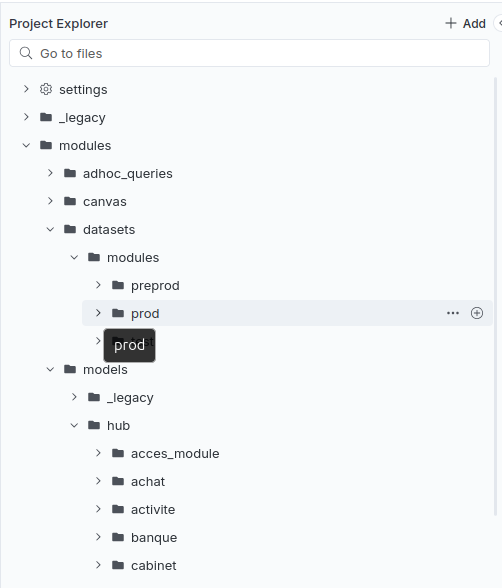
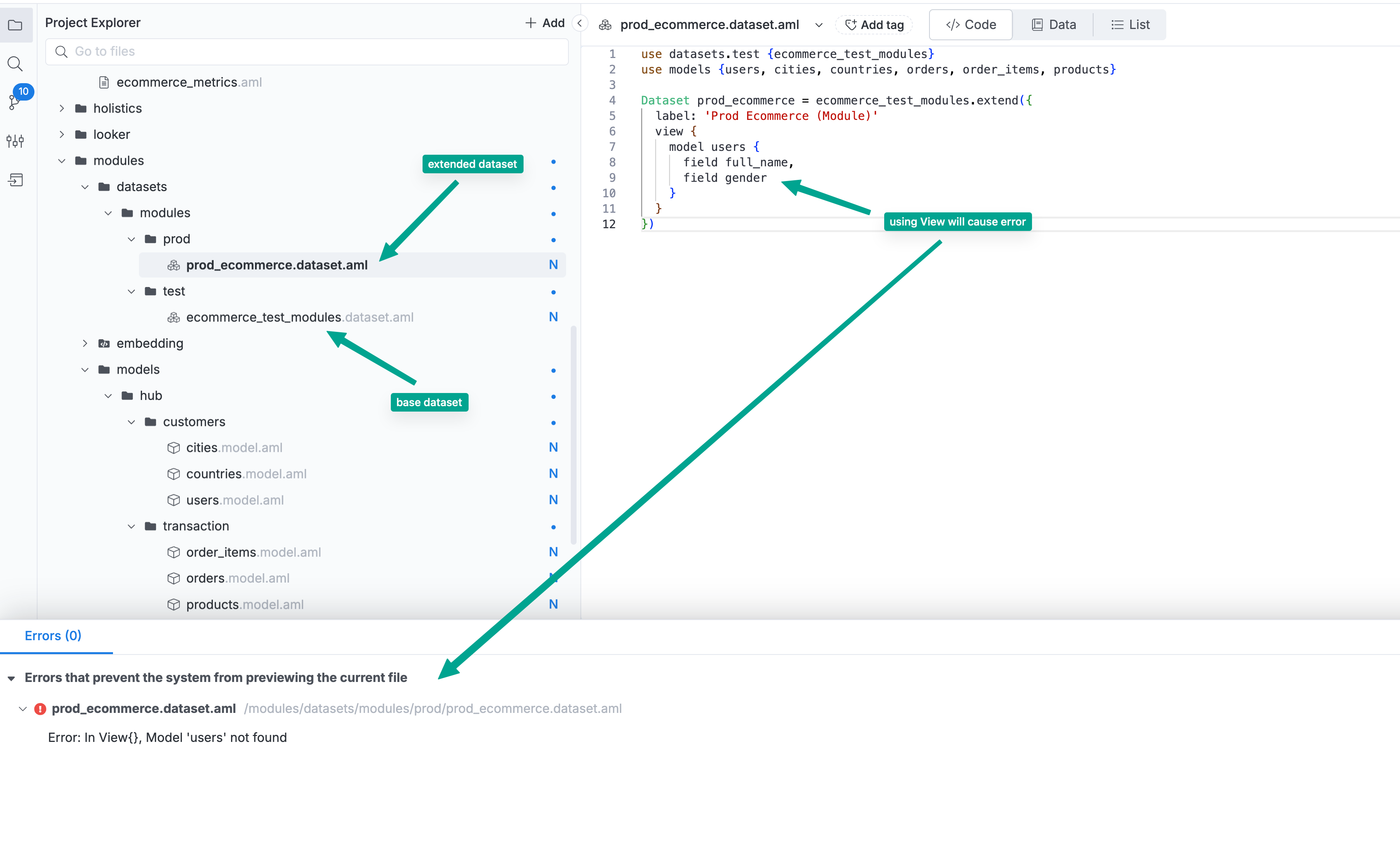
It seems that the problem is that we don’t have a “simple” organization of our project as we have multiple sub modules. In fact as you can see on the picture, our datasets are under the module ‘modules/datasets/modules/prod’ and the models are under multiple modules in the module '‘modules/models/hub/…’ .
The I can use the “use models {}” command but then in the view it is not able to find the model, and this command doesn’t work for a sub module (like use achat {} for instance)
Thanks for your answer @Khai_To . What you describe is what we have done and it works very well except when we try to build a dataset that extends the ecommerce dataset.
In that case we can’t manage to include in this dataset’s custom view a table that comes from the original dataset if this table is inside a module.
Hi @Francisco_DEL_MORAL and @dacou ,
Thanks so much for the extra details, now I understand you’re using extend with modules.
Right now, defining a Dataset View in an Extended Dataset when using modules isn’t supported. That’s why you’re seeing the error.
Could you confirm that the error in the screenshot I attached matches what you’re seeing? If so, I’m sorry for the inconvenience.
We’ve added this to our backlog and will review a fix. I’ll share an update as soon as we have an ETA.
How urgent is this for you, and is there a specific deadline or use case we should be aware of?
Hi, yes this is exactly the error that we face.
Regarding the urgency of this fix, we use modules everywhere and are currently in the process of optimizing / factorizing our datasets with extend so I would say this is urgent 
But we would like to get rid of modules for some parts of our deployment so we may have a way around this issue !